本文最后更新于9 天前,其中的信息可能已经过时,如有错误请发送邮件到big_fw@foxmail.com
IO流概述
1.什么是IO流:
- 存储和读取数据的解决方案
- I:input O:output
- 流:像水流一样传输数据
2.IO流的作用:
- 用于读写数据(本地文件,网络)
3.IO流按照流向可以分类为哪两种流:
- 输出流:程序->文件
- 输入流:文件->程序
4.IO流按照操作文件的类型可以分为哪两种流
- 字节流:可以操作所有类型的文件
- 字符流:可以操作纯文本文件
问题:既然字节流可以操作所有类型的文件,那么字符流存在的意义是什么?
5.什么是纯文本文件?
- 用windows系统自带的记事本打开并且能读懂的文件
IO流的体系
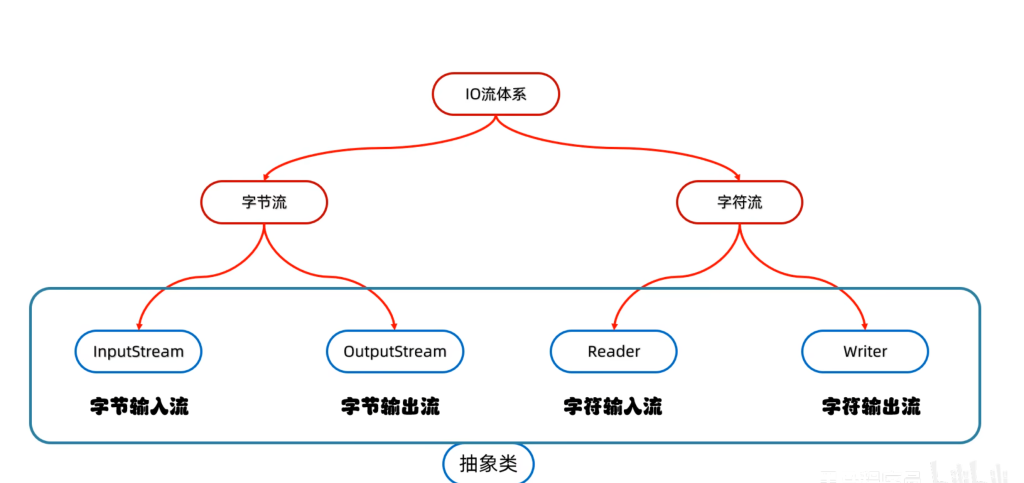
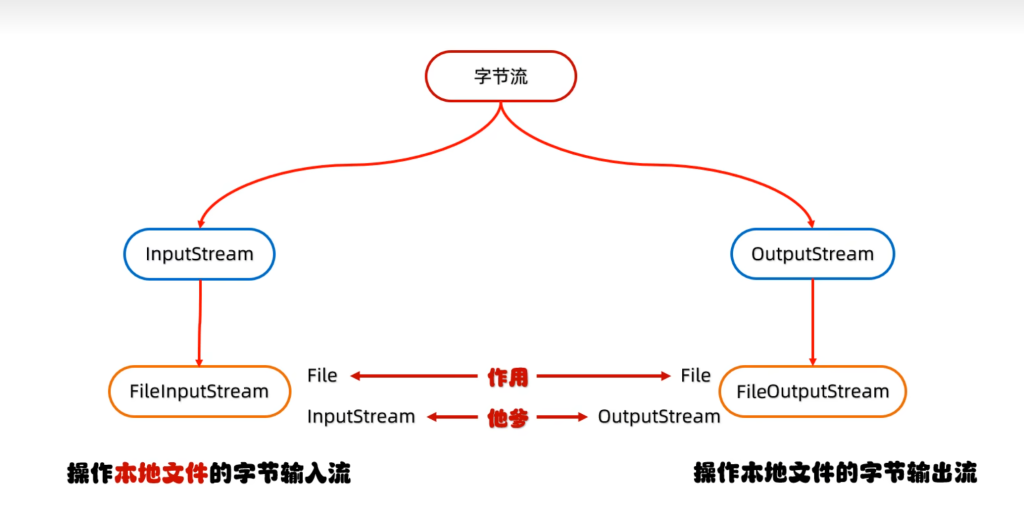
字节输出流FileOutputStream
基本用法
字节输出流初体验:
public class ByteStreamDemo1 {
    public static void main(String[] args) throws IOException {
        //创建对象
        //字节输出流 OutputStream
        FileOutputStream fileOutputStream = new FileOutputStream("a.txt");
        //写出数据
        fileOutputStream.write(97);
        //释放资源
        fileOutputStream.close();
    }
}
问题:出现FileNotFind的错误
解决:通过了解IDEA相对路径的原理,知道了相对路径的起始文件夹是整个项目所在的根目录,将”collectionDemo\\a.txt”改为”a.txt”,问题解决
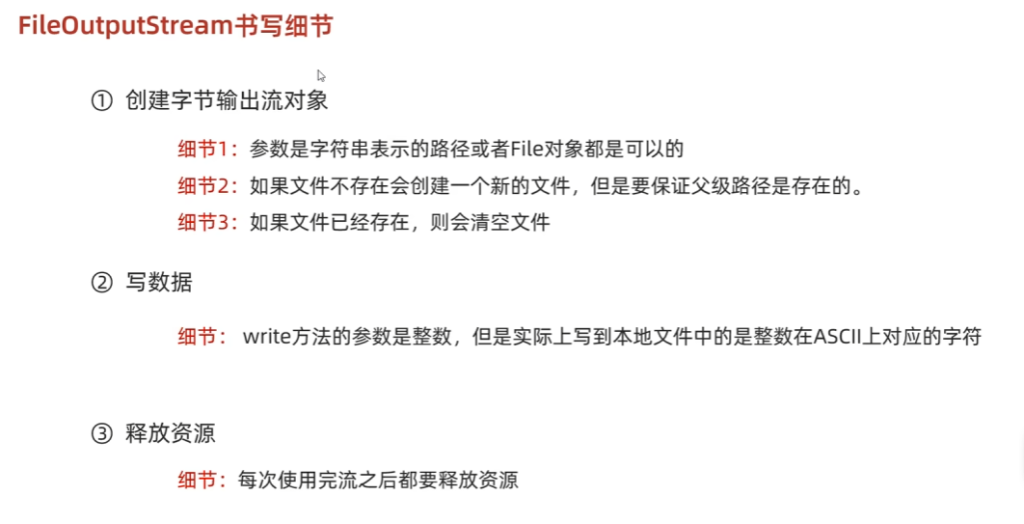
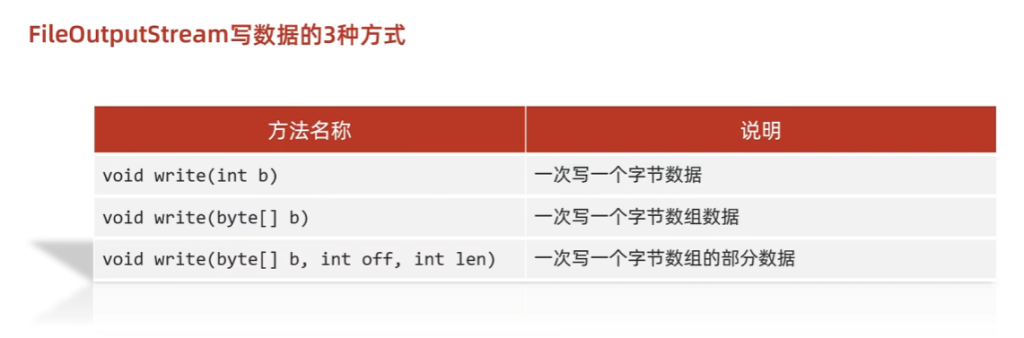
换行和续写
换行写:
- 再次写出一个换行符就可以了
- windows:\r\n
- linux:\n
- mac:\r
- 细节:
- 在windows操作系统当中,java对回车换行进行了优化。
- 虽然完整的是\r\n,但是我们写其中一个\r或者\n,
- java也可以实现换行,因为java在底层会补全
- 建议不要省略
续写:
- 如果想要续写,打开续写开关就可以了
- 开关位置:创建对象的第二个参数
- 默认false:表示关闭续写,此时创建对象就会清空文件
- 手动传递true:表示打开续写,此时创建对象不会清空文件
public class ByteStreamDemo2 {
    public static void main(String[] args) throws IOException {
        //换行续写
        FileOutputStream fos = new FileOutputStream("a.txt", true);
        String str1 = "abcd";
        byte[] bytes1 = str1.getBytes();
        fos.write(bytes1);

        //添加换行符
        String crlf = "\r\n";
        byte[] bytes2 = crlf.getBytes();
        fos.write(bytes2);

        //写数据
        String str2 = "efg";
        byte[] bytes3 = str2.getBytes();
        fos.write(bytes3);
        fos.close();
    }
}
字节输入流FileInputStream
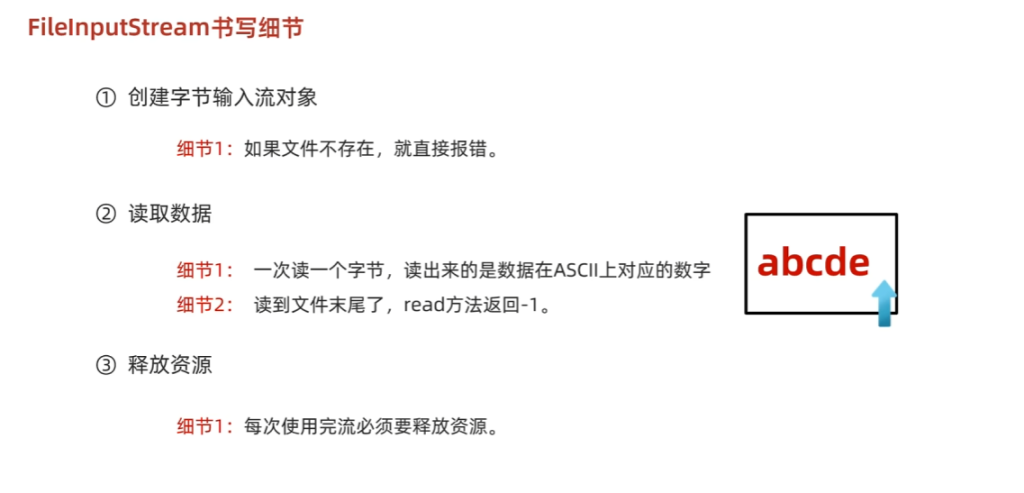
基本使用
public class ByteStreamDemo1 {
    public static void main(String[] args) throws IOException {
        //字节输入基本使用
        FileInputStream fis = new FileInputStream("a.txt");
        //读数据
        int i = fis.read();
        System.out.println((char) i);
        fis.close();
    }
}
循环读取
public class ByteStreamDemo2 {
    public static void main(String[] args) throws IOException {
        FileInputStream fis = new FileInputStream("a.txt");
        int b;
        while ((b = fis.read()) != -1) {
            System.out.print((char) b);
        }
        fis.close();
    }
}
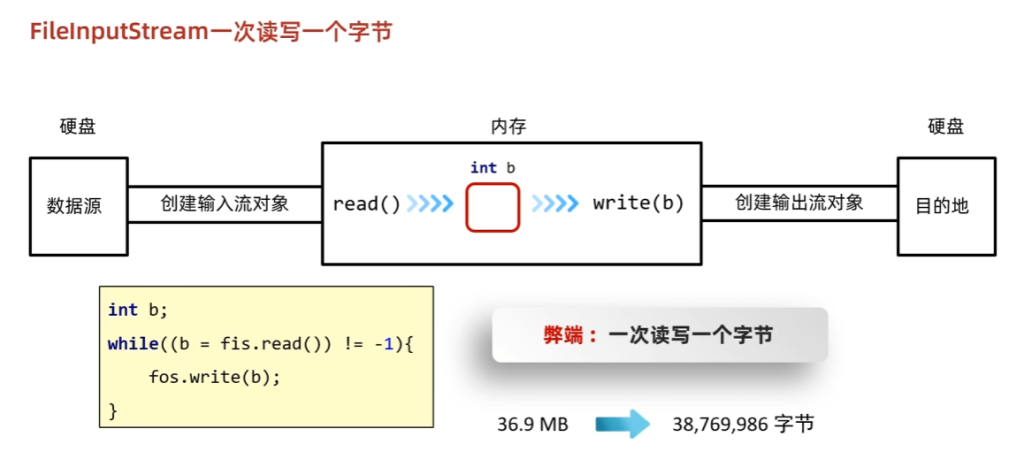
文件拷贝
基本使用:
public class ByteStreamDemo3 {
    //文件拷贝
    public static void main(String[] args) throws IOException {
        FileInputStream fis = new FileInputStream("a.txt");
        FileOutputStream fos = new FileOutputStream("b.txt");
        int b;
        while ((b = fis.read()) != -1) {
            fos.write(b);
        }
        fis.close();
        fos.close();
    }
}
一次读取一个字节的弊端:读写速度慢
一次读取多个数据:
public class ByteStreamDemo4 {
    //一次读取多个数据
    public static void main(String[] args) throws IOException {
        FileInputStream fis = new FileInputStream("a.txt");
        //创建数组,读取字节数和字节数组的大小有关
        byte[] bytes = new byte[2];
        int len;
        len = fis.read(bytes);
        System.out.println(len);
        System.out.println(new String(bytes, 0 , len));
        len = fis.read(bytes);
        System.out.println(len);
        System.out.println(new String(bytes, 0 , len));
        len = fis.read(bytes);
        System.out.println(len);
        System.out.println(new String(bytes, 0 , len));
        fis.close();
    }
}
文件拷贝(一次读写多个字节)
public class ByteStreamDemo5 {
    //文件拷贝
    public static void main(String[] args) throws IOException {
        long start = System.currentTimeMillis();
        FileInputStream fis = new FileInputStream("a.txt");
        FileOutputStream fos = new FileOutputStream("b.txt");
        int len;
        byte[] bytes = new byte[1024 * 1024 * 5];
        while ((len = fis.read(bytes)) != -1) {
            fos.write(bytes, 0 , len);
        }
        fis.close();
        fos.close();
        long end = System.currentTimeMillis();
        System.out.println(end - start);
    }
}
IO流中不同JDK版本捕获异常的方式
JDK7:
将流对象的创建放在try()中
public class ByteStreamDemo5 {
    //JDk7捕获异常
    public static void main(String[] args) throws IOException {
        long start = System.currentTimeMillis();
        try(FileInputStream fis = new FileInputStream("a.txt");
            FileOutputStream fos = new FileOutputStream("b.txt")) {
            int len;
            byte[] bytes = new byte[1024 * 1024 * 5];
            while ((len = fis.read(bytes)) != -1) {
                fos.write(bytes, 0 , len);
            }
        } catch (IOException e) {
            throw new RuntimeException(e);
        }
        long end = System.currentTimeMillis();
        System.out.println(end - start);
    }
}
JDK9:
将流对象的创建放在try-catch外面,try()中只写对象的引用即可
public class ByteStreamDemo6 {
    //JDk9捕获异常
    public static void main(String[] args) throws FileNotFoundException {
        long start = System.currentTimeMillis();
        FileInputStream fis = new FileInputStream("a.txt");
        FileOutputStream fos = new FileOutputStream("b.txt");
        try(fis;fos) {
            int len;
            byte[] bytes = new byte[1024 * 1024 * 5];
            while ((len = fis.read(bytes)) != -1) {
                fos.write(bytes, 0 , len);
            }
        } catch (IOException e) {
            throw new RuntimeException(e);
        }
        long end = System.currentTimeMillis();
        System.out.println(end - start);
    }
}
字符集详解
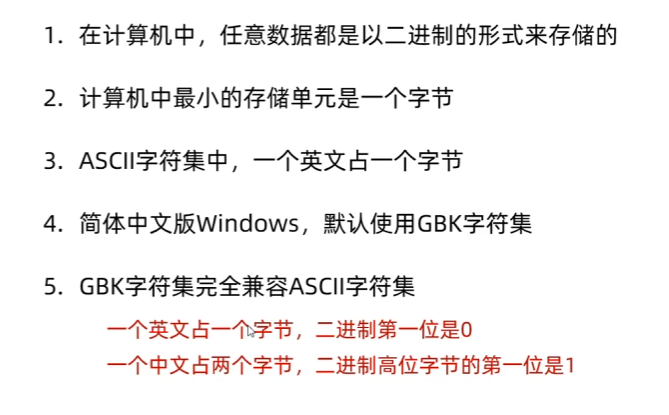
ASCII,GBK
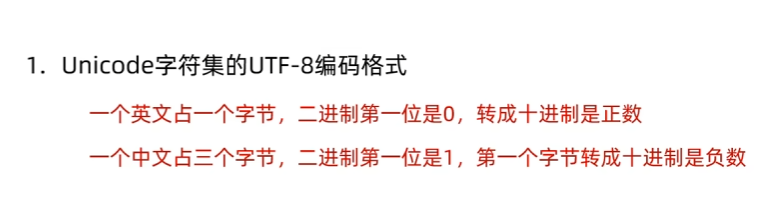
Unicode
乱码
出现的原因:
- 1.用字节流读取数据时,一个字节一个字节的读,会导致乱码,比如一个汉字在Unicode字符集中占3个字节的大小,如果只读取了第一个字节,就错了
- 2.编码解码的方式不同也会导致乱码
如何避免:
- 1.不要用字节流读取文本文件
- 2.编码解码时使用同一个码表,同一个编码方式
编码与解码:
Java中编码的方式:
- public byte[] getBytes() 使用默认方式进行编码
- public byte[] getBytes(String charsetName) 使用指定方式进行编码
Java中解码的方式:
- String(byte[] bytes) 使用默认方式进行解码
- String(byte[] bytes, String charsetName) 使用指定方式进行解码
public class CharSetDemo1 {
    //编码解码
    public static void main(String[] args) throws UnsupportedEncodingException {
        //编码UTF-8
        String s = "yao加油";
        byte[] bytes1 = s.getBytes();
        System.out.println(Arrays.toString(bytes1));
        //GBK
        byte[] bytes2 = s.getBytes("GBK");
        System.out.println(Arrays.toString(bytes2));

        //解码
        String s1 = new String(bytes1);
        String s2 = new String(bytes2);
        System.out.println(s1);
        System.out.println(s2);
    }
}
字符输入流FileReader
基本使用
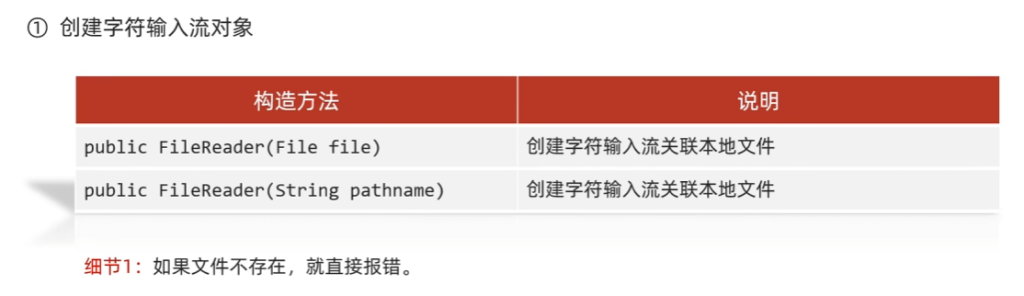
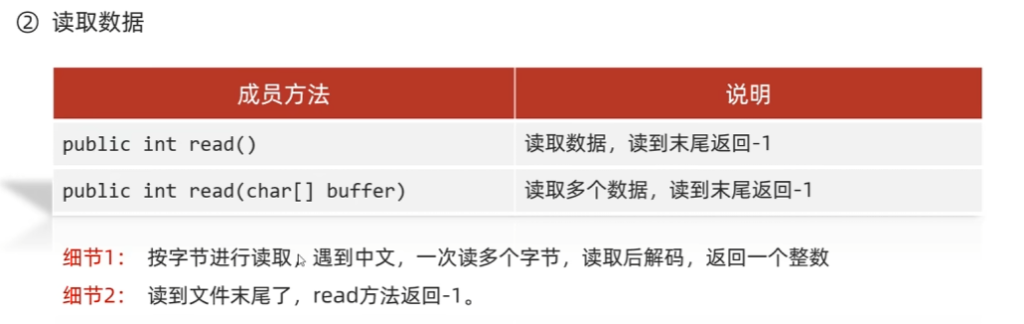
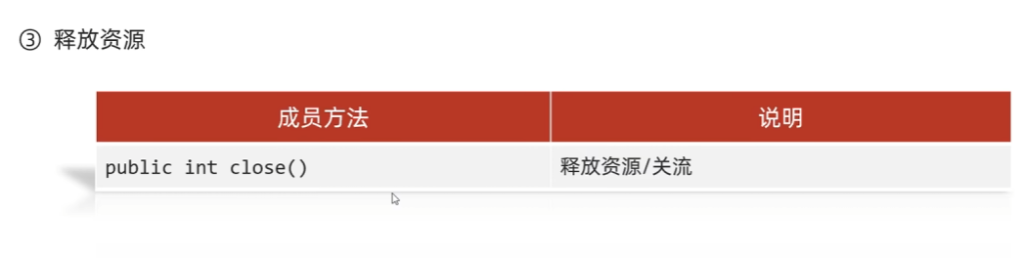
read()细节:
- 1.read():默认也是一个字节一个字节的读取的,如果遇到中文就会一次读取多个
- 2.在读取之后,方法的底层还会进行解码并转成十进制
最终把这个十进制作为返回值
这个十进制的数据也表示在字符集上的数字
英文:文件里面二进制数据 0110 0001
read方法进行读取,解码并转成十进制97
中文:文件里面的二进制数据 11100110 10110001 10001001
read方法进行读取,解码并转成十进制27721
如果像看到中文汉字,就是把这些十进制数据,再进行强转即可
空参read方法:
public class CharStreamDemo1 {
    //字符输入流基本使用
    public static void main(String[] args) throws IOException {
        //创建对象
        FileReader fr = new FileReader("a.txt");
        //读取数据
        int ch;
        while ((ch = fr.read()) != -1) {
            System.out.print((char) ch);
        }
        fr.close();
    }
}
有参read方法:
public class CharStreamDemo2 {
    //有参read方法
    public static void main(String[] args) throws IOException {
        //创建对象
        FileReader fr = new FileReader("a.txt");
        //读取数据
        char[] chars = new char[2];
        int len;
        while ((len = fr.read(chars)) != -1) {
            System.out.print(new String(chars, 0, len));
        }
        fr.close();
    }
}- 有参read方法把读取数据,解码,强转三步合并了,把强转之后的字符放到数组当中,返回读取字符的个数
- 有参read = 空参read + 强制类型转换
底层原理
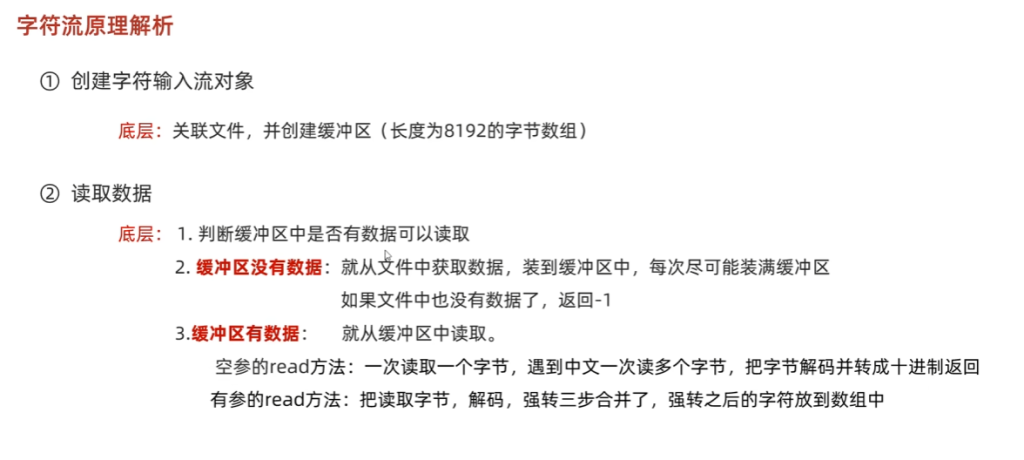
字符输出流FileWriter
构造方法
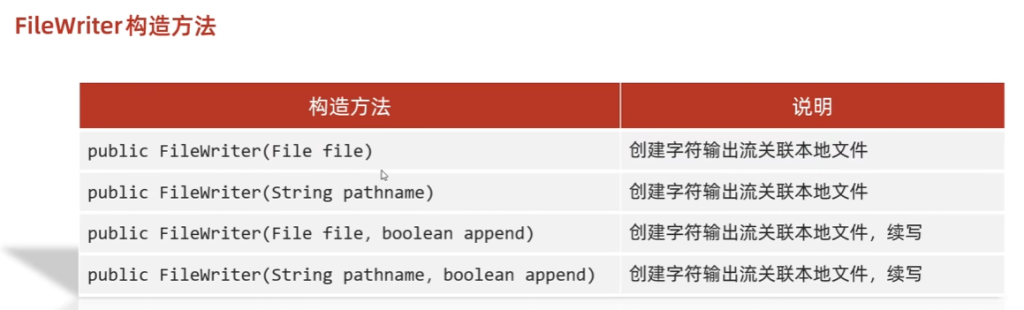
成员方法
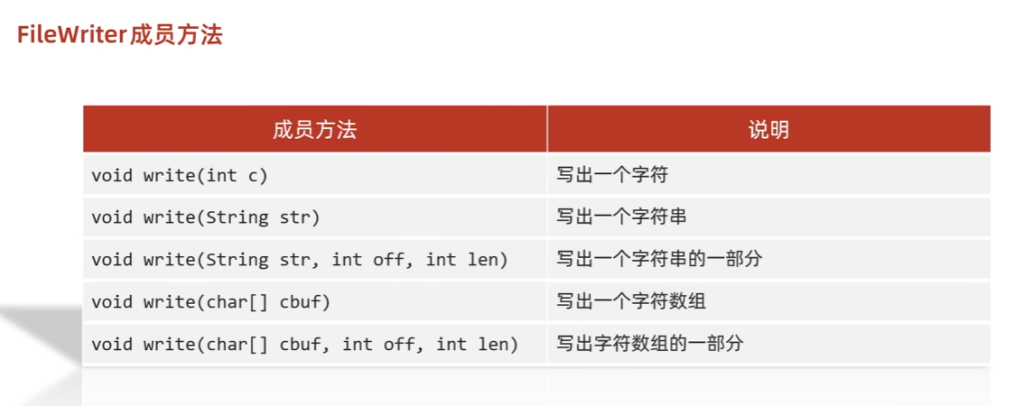
书写细节
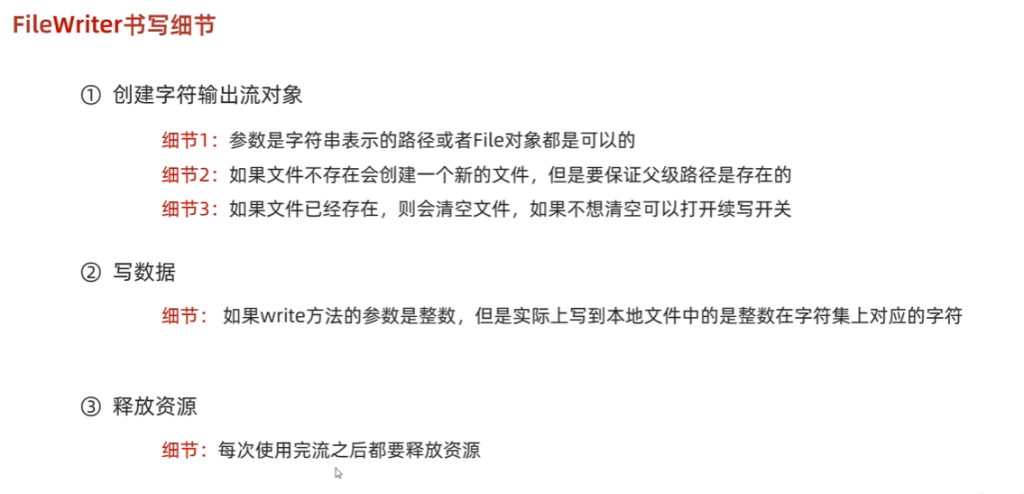
基本使用
public class CharStreamDemo3 {
    //字符输出流
    public static void main(String[] args) throws IOException {
        //创建对象
        FileWriter fw = new FileWriter(new File("a.txt"), true);
        fw.write(25105);
        fw.write("\r\n");
        fw.write("收服到神奇宝贝啦!!!");
        fw.write("\r\n");
        char[] arr = {'是', '小', '火', '龙', '!'};
        fw.write(arr);
        fw.close();
    }
}
底层原理
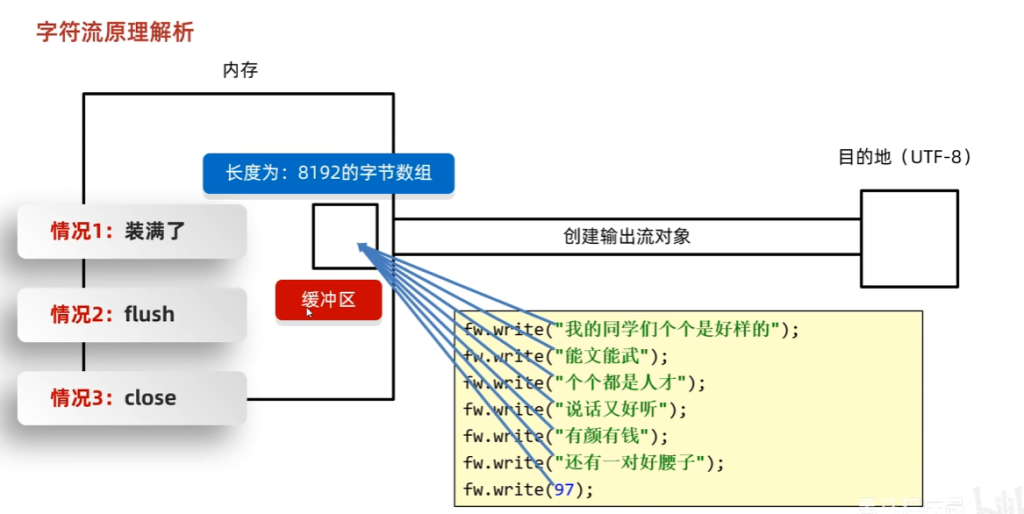
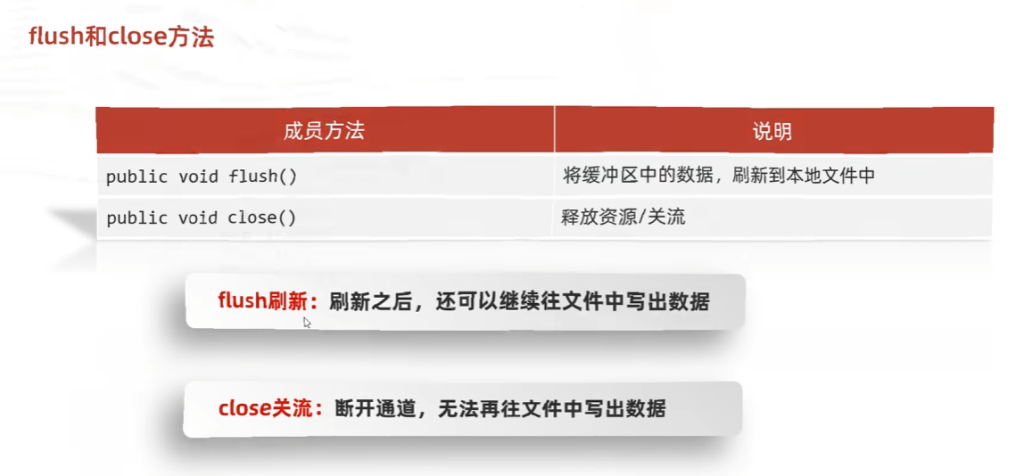
综合练习1
Test01
public class Test01 {
    /*
    * IO流综合练习1
    * 需求:
    *   拷贝文件夹
    *   考虑子文件夹
    */
    public static void main(String[] args) throws IOException {
        File root = new File("aaa");
        File target = new File("bbb");
        copyFile(root, target);
    }

    private static void copyFile(File root, File target) throws IOException {
        target.mkdirs();
        //获取文件夹中的所有文件
        File[] files = root.listFiles();
        //遍历
        for (File file : files) {
            //判断
            if(file.isFile()) {
                //拷贝
                //字节流
                FileInputStream fis = new FileInputStream(file);
                FileOutputStream fos = new FileOutputStream(new File(target, file.getName()));
                byte[] bytes = new byte[1024];
                int len;
                while ((len = fis.read(bytes)) != -1) {
                    fos.write(bytes, 0, len);
                }
                fis.close();
                fos.close();
            } else{
                //递归
                copyFile(file, new File(target, file.getName()));
            }
        }
    }
}
Test02
public class Test02 {
    //加密解密文件
    public static void main(String[] args) throws IOException {
      /*
        //加密
        FileInputStream fis = new FileInputStream("a.txt");
        FileOutputStream fos = new FileOutputStream("b.txt");
        int b;
        while ((b = fis.read()) != -1) {
            fos.write(b ^ 100);
        }
        fis.close();
        fos.close();*/
        //解密
        FileInputStream fis = new FileInputStream("b.txt");
        FileOutputStream fos = new FileOutputStream("a.txt");
        int b;
        while ((b = fis.read()) != -1) {
            fos.write(b ^ 100);
        }
        fis.close();
        fos.close();
    }
}
Test03
public class Test03 {
    /*
    * 修改文件数据
    * 对8-2-4-1-6进行排序
    * 常规方法
    */
    public static void main(String[] args) throws IOException {
        //读取数据
        //字符流
        FileReader fr = new FileReader("a.txt");
        int b;
        StringBuilder sb = new StringBuilder();
        while ((b = fr.read()) != -1) {
            sb.append((char) b);
        }
        fr.close();
        String strArr = sb.toString();
        String[] split = strArr.split("-");
        ArrayList<Integer> list = new ArrayList<>();
        for (String s : split) {
            list.add(Integer.parseInt(s));
        }
        Collections.sort(list);
        FileWriter fw = new FileWriter("a.txt");
        for (int i = 0; i < list.size(); i++) {
            if(i == list.size() - 1) {
                fw.write(list.get(i) + "");
            } else {
                fw.write(list.get(i) + "-");
            }
        }
        fw.close();
    }
}
Test04
public class Test04 {
    /*
     * 修改文件数据
     * 对8-2-4-1-6进行排序
     * 进阶方法
     */
    public static void main(String[] args) throws IOException {
        //读取数据
        //字符流
        FileReader fr = new FileReader("a.txt");
        int b;
        StringBuilder sb = new StringBuilder();
        while ((b = fr.read()) != -1) {
            sb.append((char) b);
        }
        fr.close();
        Integer[] array = Arrays.stream(sb.toString().split("-"))
                .map(Integer::parseInt)
                .sorted()
                .toArray(Integer[]::new);
        String s = Arrays.toString(array).replace(", ", "-");
        s = s.substring(1, s.length() - 1);
        FileWriter fw = new FileWriter("a.txt");
        fw.write(s);
        fw.close();
        System.out.println(s);
    }
}
字节缓冲流
体系
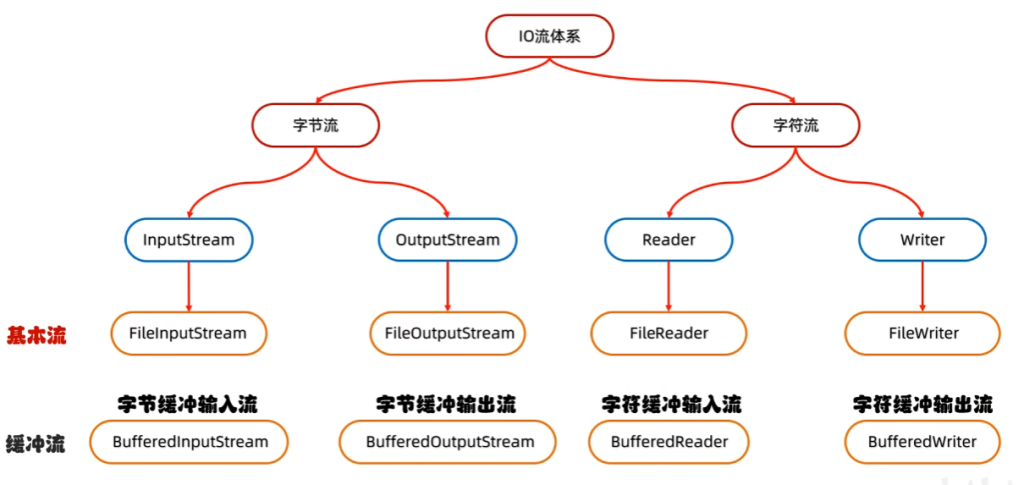
构造方法
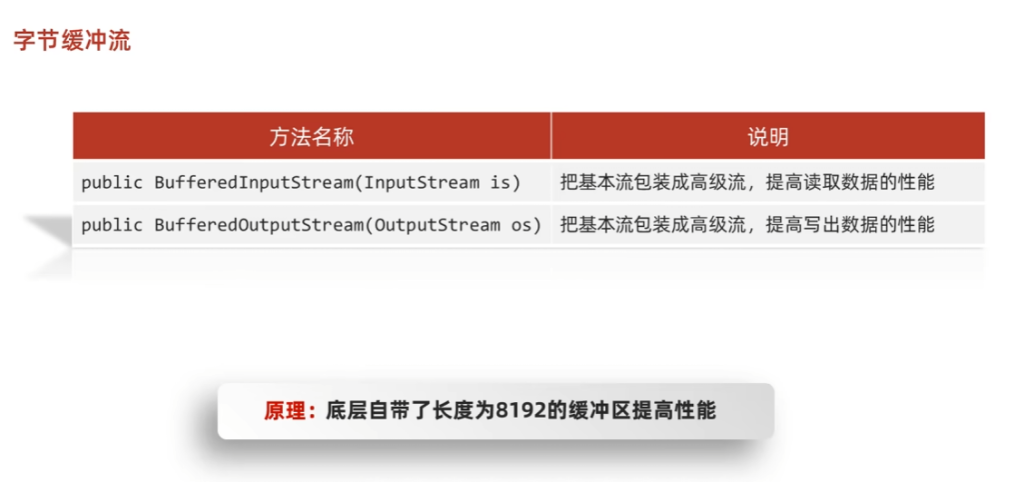
可以添加第二个参数指定缓冲区大小,比如:BufferedInputStream(InputStream is, int size);
基本使用
使用字节缓冲流进行拷贝(一次操作一个字节):
public class BufferedStreamDemo1 {
    //用字节缓冲流进行拷贝
    public static void main(String[] args) throws IOException {
        BufferedInputStream bis = new BufferedInputStream(new FileInputStream("a.txt"));
        BufferedOutputStream bos = new BufferedOutputStream(new FileOutputStream("copy.txt"));
        int b;
        while ((b = bis.read()) != -1) {
            bos.write(b);
        }
        bis.close();
        bos.close();
    }
}
使用字节缓冲流进行拷贝(一次操作多个字节):
public class BufferedStreamDemo2 {
    //用字节缓冲流进行拷贝(一次读写多个字节)
    public static void main(String[] args) throws IOException {
        BufferedInputStream bis = new BufferedInputStream(new FileInputStream("a.txt"));
        BufferedOutputStream bos = new BufferedOutputStream(new FileOutputStream("copy2.txt"));
        int len;
        byte[] bytes = new byte[1024];
        while ((len = bis.read(bytes)) != -1) {
            bos.write(bytes, 0, len);
        }
        bis.close();
        bos.close();
    }
}
原理
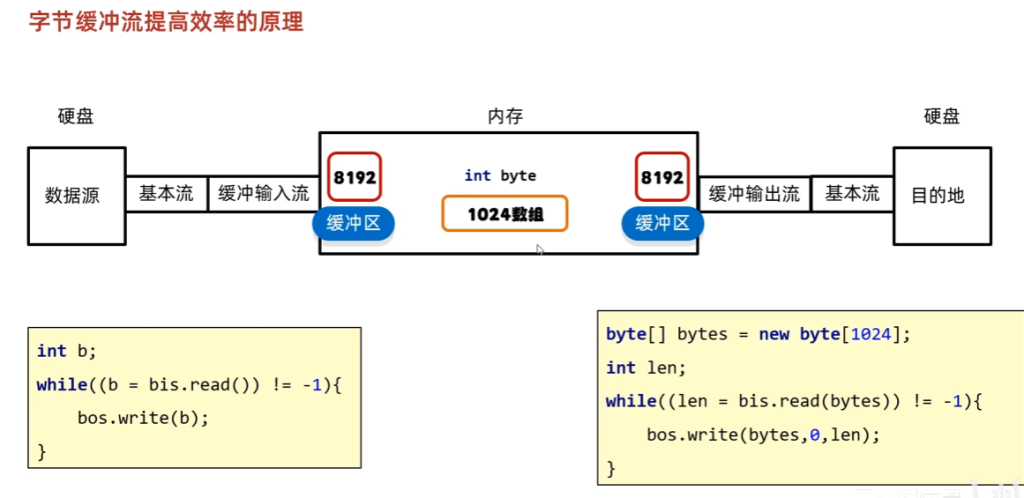
问题:字节缓冲流的缓冲区是什么时候创建的,以及是什么时候初始化的?
解答:
- 创建(分配内存):发生在
new对象(调用构造方法) 时。 - 初始化(填充数据/刷新):对于输入流,发生在第一次调用
read()时;对于输出流,发生在调用flush()或缓冲区写满时。
字符缓冲流
构造方法
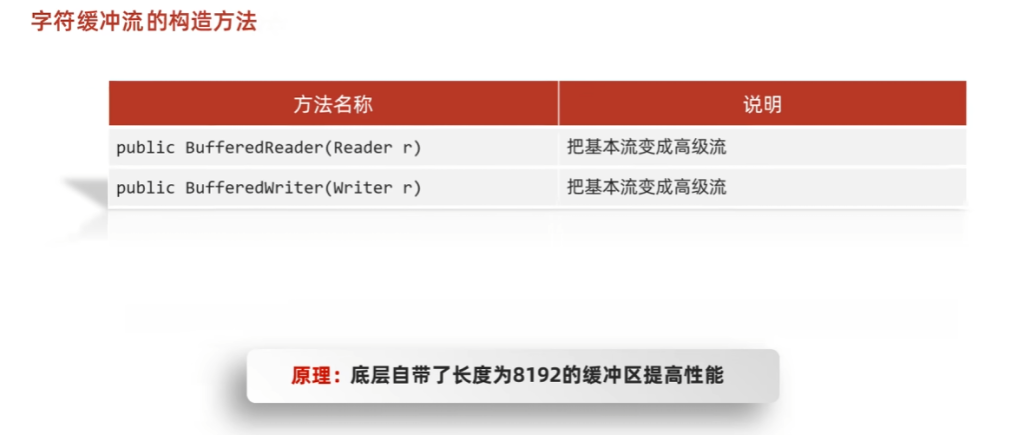
特有方法
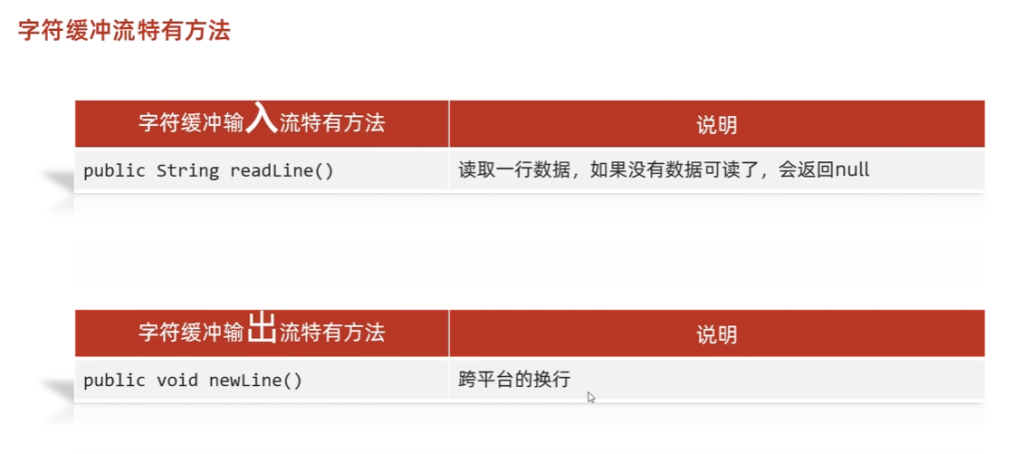
基本使用
用字符缓冲输入流读取数据
public class BufferedStreamDemo3 {
    //用字符缓冲输入流读取数据
    public static void main(String[] args) throws IOException {
        BufferedReader br = new BufferedReader(new FileReader("a.txt"));
        String line;
        while ((line = br.readLine()) != null) {
            System.out.println(line);
        }
        br.close();
    }
}
用字符缓冲输出流写数据
public class BufferedStreamDemo4 {
    //用字符缓冲输出流写数据
    public static void main(String[] args) throws IOException {
        BufferedWriter bw = new BufferedWriter(new FileWriter("b.txt", true));
        bw.write("哈喽呀");
        bw.newLine();
        bw.write("我换行了呀");
        bw.newLine();
        bw.close();
    }
}
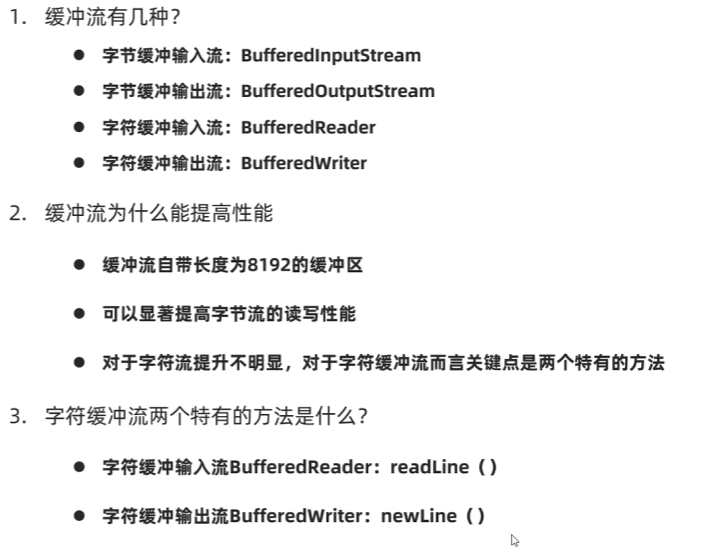
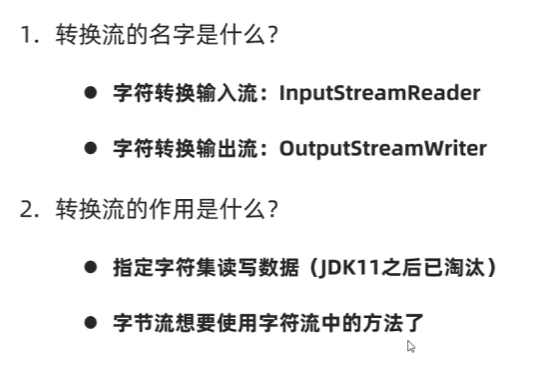
转换流
概述
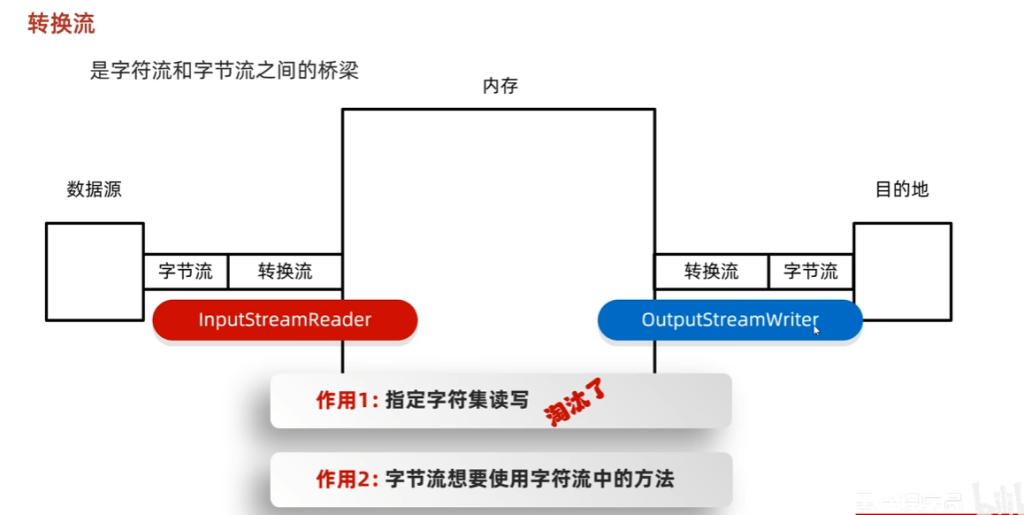
基本使用
指定字符集读写
public class ConvertStreamDemo1 {
    /*
    * 利用转换流按照指定字符编码读取
    * gbkfile.txt
    */
    public static void main(String[] args) throws IOException {
        /*InputStreamReader isr = new InputStreamReader(new FileInputStream("gbkfile.txt"), "GBK");
        int b;
        while ((b = isr.read()) != -1) {
            System.out.print((char) b);
        }
        isr.close();*/

        //JDK11之后
        FileReader fr = new FileReader("gbkfile.txt", Charset.forName("GBK"));
        int b;
        while ((b = fr.read()) != -1) {
            System.out.print((char) b);
        }
        fr.close();
    }
}
public class ConvertStreamDemo2 {
/*
* 利用转换流按照指定字符集编码写出
*/
public static void main(String[] args) throws IOException {
/*OutputStreamWriter osw = new OutputStreamWriter(new FileOutputStream("gbkfile.txt"), "GBK");
osw.write("哈喽呀");
osw.close();*/
//GDK11之后
FileWriter fw = new FileWriter("b.txt", Charset.forName("GBK"));
fw.write("你好呀");
fw.close();
}
}
public class ConvertStreamDemo3 {
    /*
    * 将本地文件的GBK文件,转成UTF-8
    */
    public static void main(String[] args) throws IOException {
        //JDK11之前
        InputStreamReader isr = new InputStreamReader(new FileInputStream("gbkfile.txt"), "GBK");
        OutputStreamWriter osw = new OutputStreamWriter(new FileOutputStream("a.txt"), "UTF-8");
        int b;
        while ((b = isr.read()) != -1) {
            osw.write(b);
        }
        isr.close();
        osw.close();
        //JDK11之后
        FileReader fr = new FileReader("gbkfile.txt", Charset.forName("GBK"));
        FileWriter fw = new FileWriter("c.txt", Charset.forName("UTF-8"));
        int c;
        while ((c = fr.read()) != -1) {
            fw.write(c);
        }
        fr.close();
        fw.close();
    }
}
利用字节流读取文件中的数据(用字符缓冲流方法)
public class ConvertStreamDemo4 {
    /*
    * 利用字节流读取文件中的数据(用字符缓冲流方法)
    */
    public static void main(String[] args) throws IOException {
        BufferedReader br = new BufferedReader(new InputStreamReader(new FileInputStream("a.txt")));
        String line;
        while ((line = br.readLine()) != null) {
            System.out.println(line);
        }
        br.close();
    }
}
总结
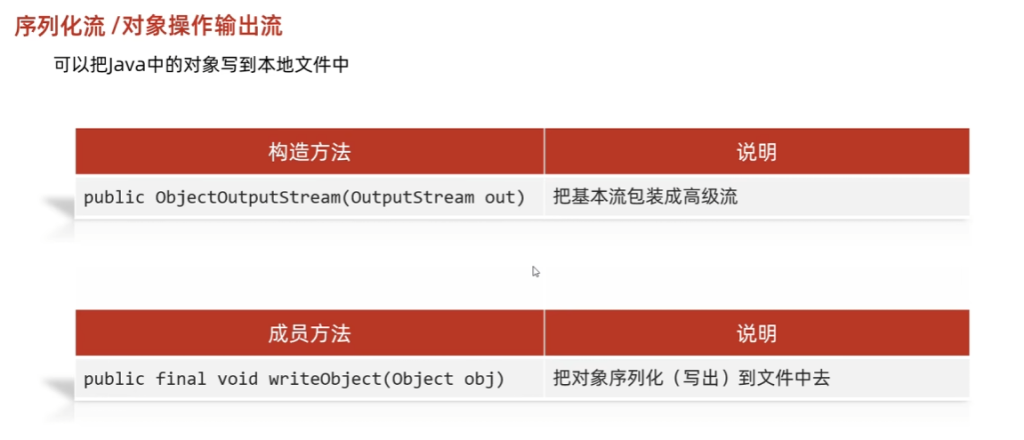
序列化流
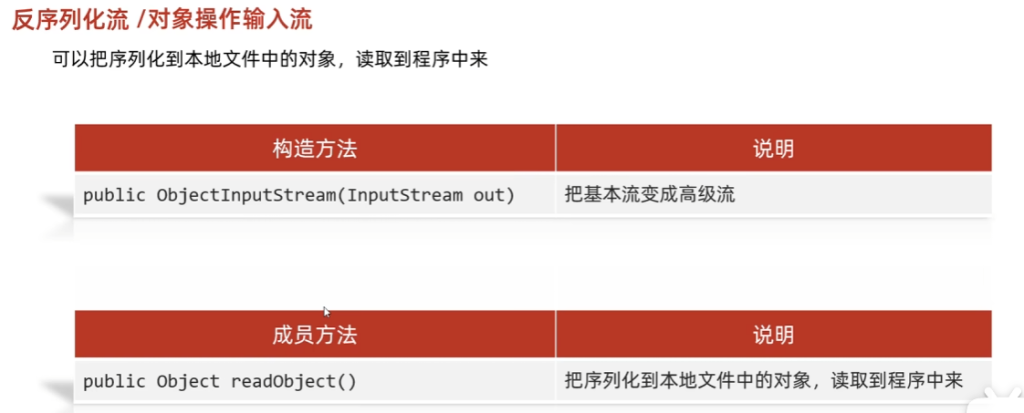
概述
基本使用
将一个对象写入文件中:
public class ObjectStreamDemo1 {
    /*
    * 利用序列化流将一个对象写入文件中
    */
    public static void main(String[] args) throws IOException {
        Student stu = new Student("章鱼哥", 30);
        ObjectOutputStream ois = new ObjectOutputStream(new FileOutputStream("a.txt"));
        ois.writeObject(stu);
        ois.close();
    }
}
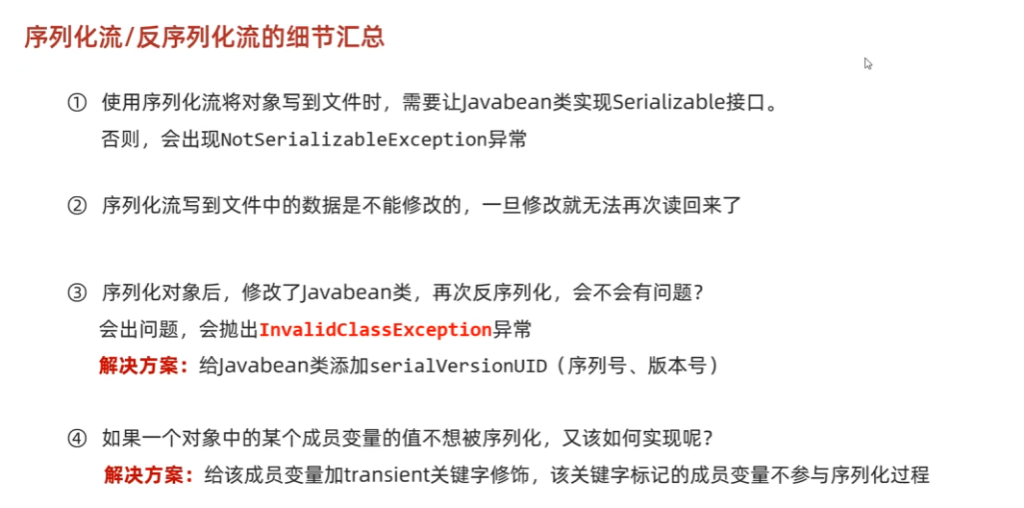
注意:使用对象输出流将对象保存到文件时会出现NotSerializableException异常
解决方案:需要让Javabean类实现Serializable接口,该接口没有抽象方法,是一个标记型接口
将文件中的数据写入对象中
public class ObjectStreamDemo2 {
    /*
    * 利用反序列化流将文件中的数据写出到对象中
    */
    public static void main(String[] args) throws IOException, ClassNotFoundException {
        ObjectInputStream ois = new ObjectInputStream(new FileInputStream("a.txt"));
        Object o = ois.readObject();
        ois.close();
        System.out.println(o);
    }
}
细节
综合练习
写多个对象
public class Test05 {
    /*
    * 写多个对象
    */
    public static void main(String[] args) throws IOException {
        ObjectOutputStream ois = new ObjectOutputStream(new FileOutputStream("a.txt"));
        ArrayList<Student> stuList = new ArrayList<>();
        Collections.addAll(stuList, new Student("海绵宝宝", 18), new Student("章鱼哥", 30), new Student("派大星", 20));
        ois.writeObject(stuList);
        ois.close();
    }
}
读多个对象
public class Test06 {
    //读多个对象
    public static void main(String[] args) throws IOException, ClassNotFoundException {
        ObjectInputStream ois = new ObjectInputStream(new FileInputStream("a.txt"));
        ArrayList<Student> list = (ArrayList<Student>)ois.readObject();
        ois.close();
        System.out.println(list);
    }
}
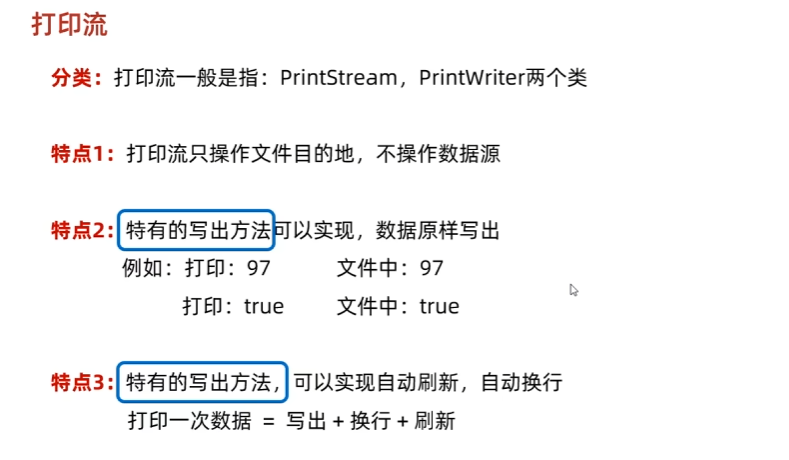
打印流
概述
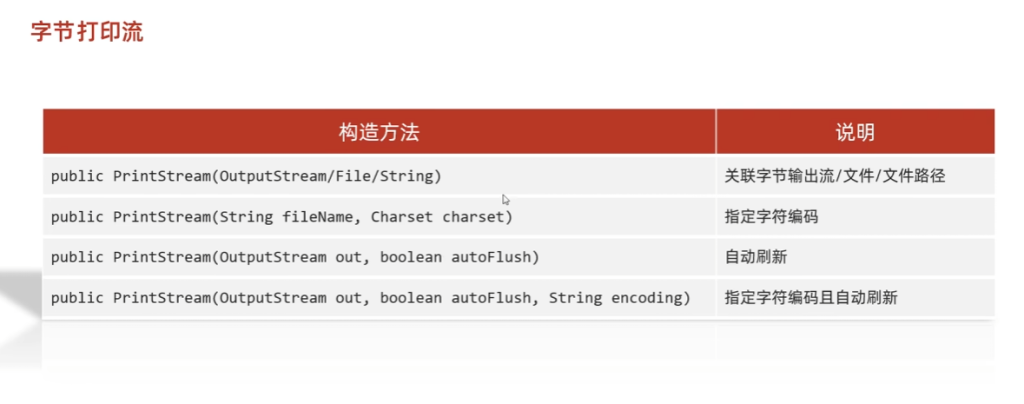
字节打印流
构造方法
成员方法
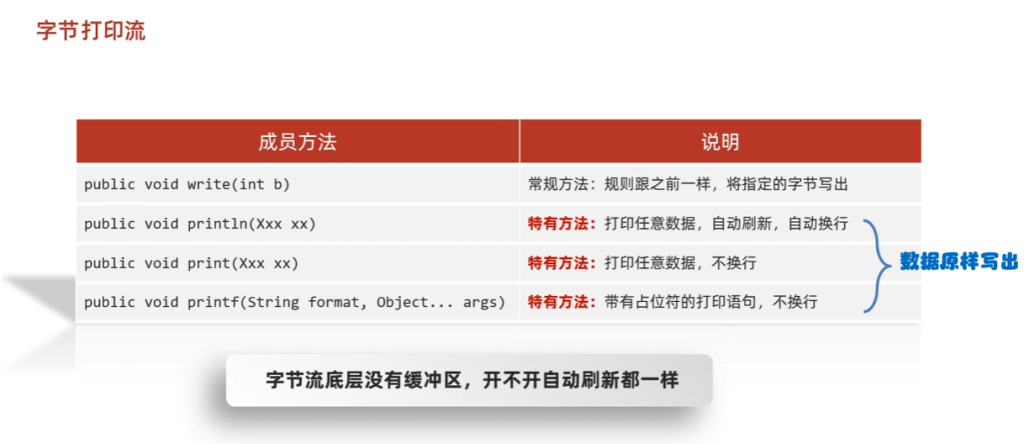
基本使用
public class PrintStreamDemo1 {
    /*
    * 字节打印流
    */
    public static void main(String[] args) throws FileNotFoundException {
        PrintStream ps = new PrintStream(new FileOutputStream("a.txt"), true, Charset.forName("UTF-8"));
        ps.println("哈喽呀");
        ps.print("我是蜡笔小新");
        ps.println();
        ps.printf("%s是%s的", "蜡笔小新", "春日部");
        ps.close();
    }
}
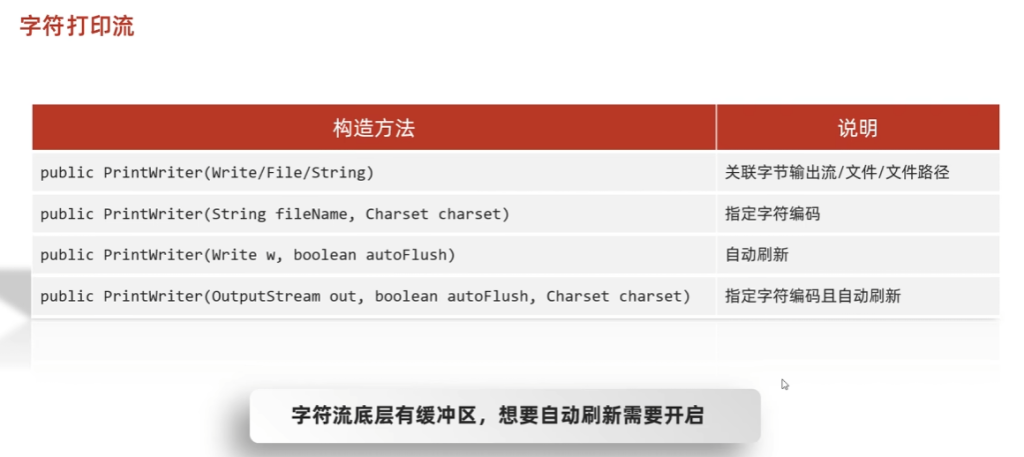
字符打印流
构造方法
成员方法
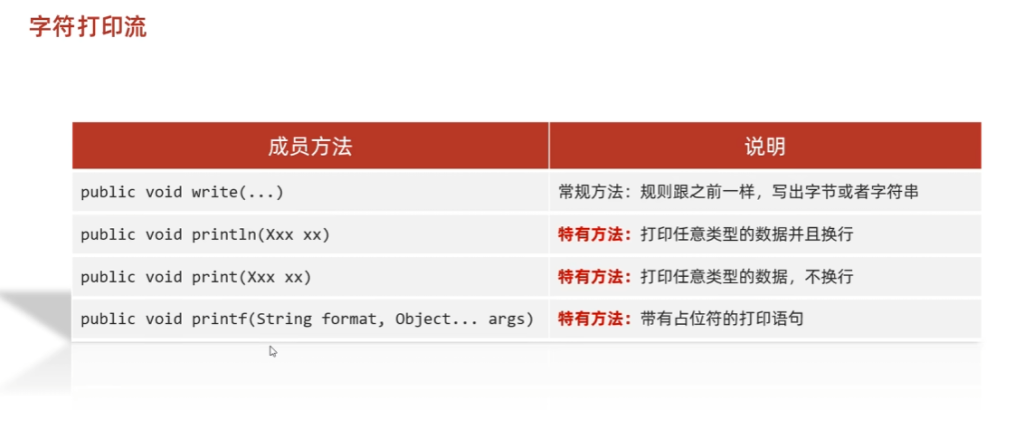
基本使用
public class PrintStreamDemo2 {
    /*
    * 字符打印流
    */
    public static void main(String[] args) throws IOException {
        PrintWriter pw = new PrintWriter(new FileWriter("a.txt"), true);
        pw.println("哈喽呀");
        pw.print("我是蜡笔小新");
        pw.println();
        pw.printf("%s是%s的", "蜡笔小新", "春日部");
        pw.close();
    }
}
总结
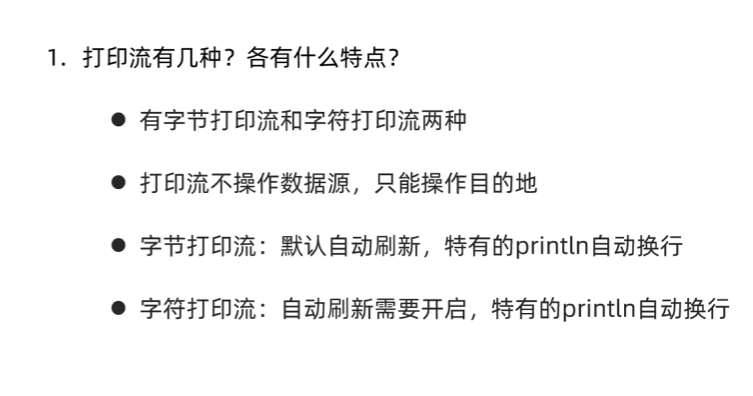
解压缩流/压缩流
解压缩流
作用
将一个压缩包解压
基本使用
public class ZipStreamDemo1 {
    //解压缩流
    public static void main(String[] args) throws IOException {
        File root = new File("F:\\TestFile\\IO\\aaa.zip");
        File target = new File("F:\\TestFile\\IO\\");
        unzip(root, target);
    }

    private static void unzip(File root, File target) throws IOException {
        ZipInputStream zip = new ZipInputStream(new FileInputStream(root));
        ZipEntry entry;
        while ((entry = zip.getNextEntry()) != null) {
            File file = new File(target, entry.toString());
            if (entry.isDirectory()) {
                file.mkdirs();
            } else {
                int b;
                FileOutputStream fos = new FileOutputStream(file);
                while ((b = zip.read()) != -1) {
                    fos.write(b);
                }
                fos.close();
                zip.closeEntry();
            }
            System.out.println(entry.toString());
        }
        zip.close();
    }
}
压缩流
作用
将一个文件夹或者文件进行压缩
基本使用
压缩一个文件夹
public class ZipStreamDemo2 {
    //压缩流压缩文件夹
    public static void main(String[] args) throws IOException {
        //压缩哪个文件?
        File src = new File("F:\\TestFile\\IO\\aaa");
        //压缩到哪?
        File parentFile = src.getParentFile();//F:\TestFile\IO
        File dest = new File(parentFile, src.getName() + ".zip");//F:\TestFile\IO\aaa.zip
        //创建压缩流对象
        ZipOutputStream zos = new ZipOutputStream(new FileOutputStream(dest));
        //将src中的每个文件夹或文件转换成ZipEntry对象存入aaa.zip
        toZip(src, zos, src.getName());
        //释放资源
        zos.close();

    }

    private static void toZip(File src, ZipOutputStream zos, String name) throws IOException {
        //获取src中的所有文件
        File[] files = src.listFiles();
        //遍历
        for (File file : files) {
            if(file.isFile()) {
                //文件,转换为ZipEntry对象,put进zos
                ZipEntry zipEntry = new ZipEntry(name + "\\" + file.getName());
                zos.putNextEntry(zipEntry);
                //拷贝文件中的数据到entry对象中
                int b;
                FileInputStream fis = new FileInputStream(file);
                while ((b = fis.read()) != -1) {
                    zos.write(b);
                }
                fis.close();
                zos.closeEntry();
            } else {
                //文件夹,递归
                toZip(file, zos, name + "\\" + file.getName());
            }

        }
    }
}